We’ve all been there, stuck at the toll booth, scrambling to reload our eWallet while cars line up behind us. With SOS Balance, those moments of panic are a thing of the past. Available exclusively to our loyal TNG eWallet users, this feature automatically covers your toll charges at RFID and PayDirect-enabled toll plazas when your eWallet balance runs low, allowing you to keep moving seamlessly and stress-free. Simply repay the amount within 24 hours.
There’s no fee, subscription, or sign-ups required. It’s there when you need it. To keep enjoying this convenience, just use your eWallet actively and settle any outstanding amount within 24 hours. SOS Balance works for all vehicles linked to your eWallet account with RFID tags and PayDirect payment activated.
Currently, SOS Balance is available for toll payments only but stay tuned, we’re working to bring this feature to even more services soon.
How to qualify
SOS Balance is offered to active TNG eWallet users and promptly clear any outstanding payments. If you're eligible, you’ll receive a push notification informing you that SOS Balance is now available.
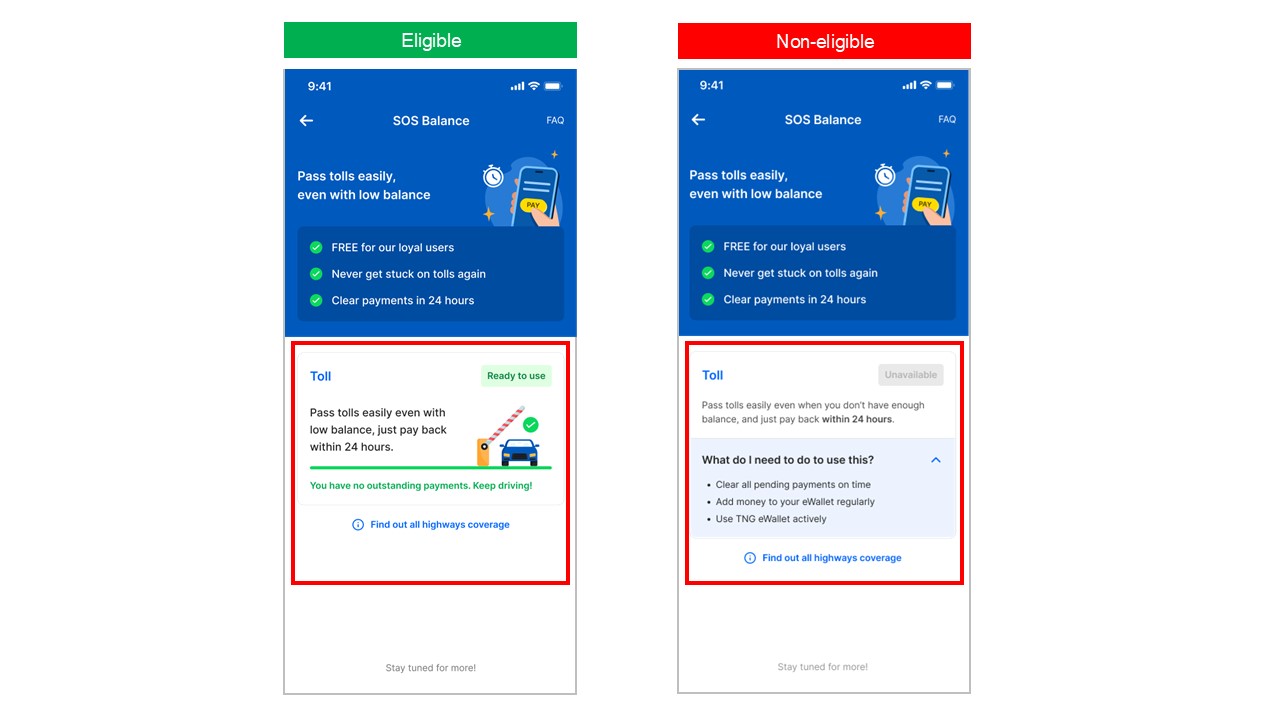
To check your eligibility, simply tap the SOS Balance icon or the car icon at the top of your eWallet home screen. You’ll be able to see your status, as shown here:
Watch this video to learn more about SOS Balance:
Learn how to check your eligibility, view your outstanding balance, and easily repay the amount within 24 hours.
Have a question?
What is TNG eWallet SOS Balance?
SOS Balance is an exclusive feature designed for our loyal TNG eWallet users, currently available for toll payments only. It ensures you’re never stuck at critical moments due to insufficient eWallet balance, covering essential payments on your behalf. Best of all, there are no additional fees to enjoy this benefit. Simply reload your eWallet within 24 hours and any outstanding SOS Balance will be automatically deducted. More services will be added to SOS Balance soon, making this feature even more rewarding and convenient.
Where can I access SOS Balance feature?
You can access SOS Balance from the:
- “Car” icon at the top of your eWallet home screen
- SOS Balance outstanding message on the home screen
- “More” option under “My Favourites”, then type “SOS Balance” in the search bar
How do I enable TNG eWallet SOS Balance feature?
SOS Balance is automatically enabled for our loyal TNG eWallet users—there’s no need to opt in. If you’re eligible, you’ll receive a push notification letting you know that SOS Balance is now available to you. You can also check your eligibility by tapping the SOS Balance icon or the car icon at the top of your eWallet for confirmation.
How do I qualify for TNG eWallet's SOS Balance?
SOS Balance is exclusively offered to our most loyal users. To increase your chances of eligibility, you will need to consistently demonstrate the following:
a) Clearing all outstanding payments promptly
b) Add money frequently to your eWallet
c) Actively using their eWallet for transactions
I am eligible for SOS Balance, but SOS Balance did not work when I passed through a toll. Why?
There are a few reasons why SOS Balance might not have been triggered:
- Toll plaza not supported
You may have entered a toll plaza that does not currently support RFID or PayDirect payments. For a complete list of eligible toll plazas, please refer here. - Sufficient eWallet balance
If your eWallet balance was enough to cover the toll charge, SOS Balance wouldn’t be triggered. - PayDirect not enabled
In order for SOS Balance to work you need to have RFID or PayDirect enabled on your eWallet. Your PayDirect may have been deactivated.
To enable PayDirect for toll and parking payments to be automatically deducted from your eWallet balance:
- Open your eWallet app and tap on the "TNG Card" icon
- Tap on the linked card, then the three dots to open the menu
- Check the status of PayDirect. If it’s disabled, tap on PayDirect and toggle the button to enable
- Enter your 6-digit PIN to confirm
If no card is linked, you’ll need to link one. We recommend the enhanced Touch 'n Go card with NFC functionality, which allows you to reload your card directly from your eWallet for added convenience. To link a card, tap "Add Card" and follow the steps provided. You can link up to 15 cards to your eWallet account.
How does TNG eWallet SOS Balance work at tolls?
SOS Balance works at either Touch 'n Go RFID or PayDirect enabled toll plazas. It activates automatically when your eWallet balance is low, ensuring seamless toll payments. It covers the payment on behalf of eligible users passing through tolls with Touch 'n Go RFID tag or PayDirect deduction. Users have a 24-hour grace period to clear any outstanding SOS Balance amount to continue enjoying the feature. Best of all, there’s no fee for this service.
Note: SOS Balance is available exclusively for selected TNG eWallet users. To check your eligibility status, launch your eWallet and tap on SOS Balance.
Do you need to pay to use TNG eWallet SOS Balance?
No, SOS Balance is provided free of charge to eligible TNG eWallet users. When SOS Balance is triggered to cover a payment, simply ensure the outstanding amount is cleared within 24 hours to continue enjoying this convenient feature.